Bringing your personal mobile phone to Pakistan doesn’t always mean you’ll have to pay PTA taxes. If you’re an overseas Pakistani or a foreign national visiting the country, you can register a mobile device at no cost for 120 days through PTA’s Device Identification, Registration and Blocking System (DIRBS). Pakistani residents who buy or import a phone for regular, permanent use don’t qualify for this free route. Their devices go through the standard paid registration process instead, based on the phone’s value and other factors.
Many travelers confuse this facility with permanent PTA approval. In reality, free registration is available only to eligible visitors and is designed for short-term stays. Here’s everything you need to know about eligibility, the registration process, and what happens after the 120-day period ends.
Is PTA Mobile Registration Actually Free?
Only under one arrangement: Temporary Mobile Registration facility
PTA runs this specifically for overseas Pakistanis and foreign nationals. Under this setup, a visiting phone device can be registered and then used with a local SIM for 120 days without paying any FBR tax. The whole cycle runs through the DIRBS portal, so there’s no need to go to an airport counter or a PTA office.
Important: Temporary registration does not permanently approve your mobile device. If you continue using the phone after the temporary registration expires, you’ll need to complete the permanent PTA registration process and pay any applicable taxes and duties.
Who Qualifies for Free PTA Registration
Free temporary registration is available specifically to overseas Pakistanis, dual nationality holders traveling on a foreign or Pakistani passport, and foreign nationals visiting on a valid visa. The device must be for personal use, and registration has to be completed using the same passport the person traveled on.
Eligibility is verified using your passport details and FIA immigration records. If the system cannot verify your arrival, your application may be delayed or rejected.
This facility is available on every visit, provided you meet the eligibility requirements each time you enter Pakistan.
It does not extend to
- Pakistani residents who are currently returning from a trip abroad
- Phones imported through courier or postal services
- Devices being brought in for resale rather than personal use.
PTA cross-checks this against immigration and travel records, so applications that don’t match the traveler’s actual entry details typically get flagged or rejected.
How to Register Your Mobile Phone with PTA for Free
Before you start registering mobile phones with the PTA, you will need a few essential items, such as a passport and an IMEI number. Once you have everything, let’s move forward with the PTA registration process for foreigners and overseas Pakistanis.
Step-by-Step: How to Register Your Mobile for Free via DIRBS
DIRBS stands for Device Identification, Registration, and Blocking System. Launched by Pakistan Telecommunication Authority (PTA) in 2019. The function was to curb the smuggling of illegal phones in the country and ensure that all the phones were legally registered and verified by the authority.
Here are the steps to register your mobile phone with PTA using the DIRBS portal.
1. Go to the DIRBS portal.
Visit dirbs.pta.gov.pk/drs and sign up for an account
Choose Foreign Individual, and the page will automatically change the registration requirements.
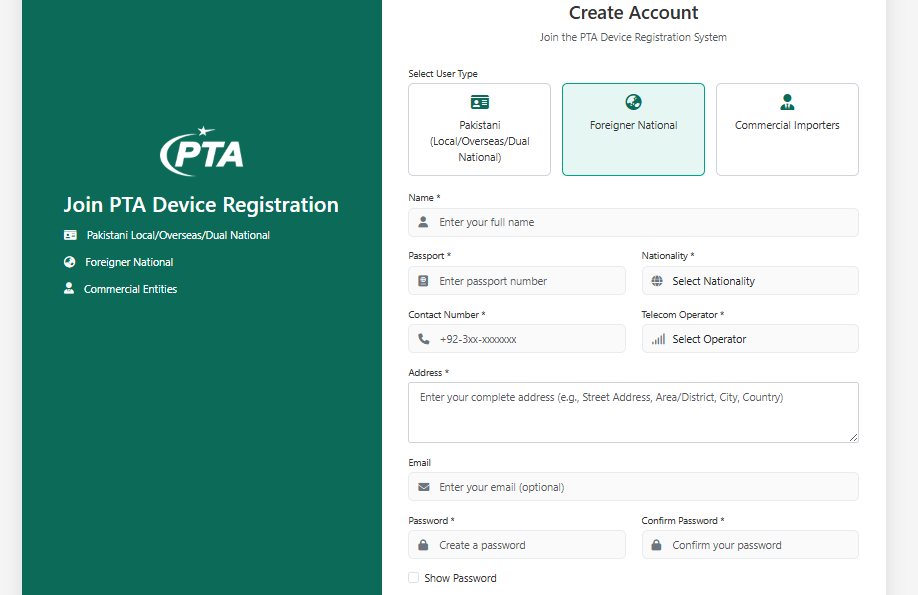
2. Complete the Personal Details
Complete all the personal details, which include:
- Name
- Passport number
- Nationality
- Contact number
- Telecom operator
- Address
- Password
Make sure that the email is valid and in use because the portal sends you a verification link.
3. Verify Your Email
Check your inbox and spam folder for the verification email from PTA. Click the link to verify your email and activate your account.
4. Log in to Your Account
After logging in, navigate to Individual COC from the left-side menu.
Next, click on “Apply for COC”
5. Select the Correct Registration Type
Choose “Temporary Registration for Overseas Pakistanis / Foreign Nationals” rather than the standard individual registration option.
Now enter your IMEI and mobile number into the portal to forward
Dial *#06# on your phone, and it will display the IMEI number.
6. Track Your Application
Click the “My Applications” tab on your dashboard, and here you will find the status of registration:
- Pending
- Approved
- Rejected
7. Confirmation of PTA Registration
When registration is approved, the registration number will be sent to you via SMS and/or email. Congratulations, your phone is now registered and can be used on any mobile network in Pakistan
Once approved, the device is registered for 120 days from the date of entry, and no PSID or tax payment is generated for this category.
Step-by-Step Guide to USSD Method Registration via *8484#
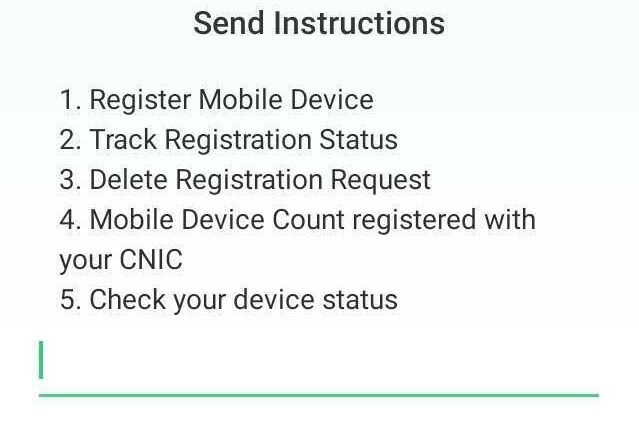
- Open your dialer, type *8484#, and press the call key. A menu will pop up; select your preferred language, then proceed.
- After that, you will see various options; choose 1 to Register Mobile Device
- Then you’ll be asked if you are Pakistani or a Foreigner; Press 2 for Foreigner
- Now enter your passport number
- Then choose the number of SIM slots you have on your device
- Enter the IMEI number; both if you have a dual-SIM phone, to complete your device’s registration with PTA.
Shortly after submission, you will receive a confirmation SMS. If approved, your device is now registered; if pending review, you will be alerted once it is reviewed.
If you are unable to register using either of these methods, you can always walk into the Mobile Operator Facilitation Center of Jazz, Zong, Telenor, or Ufone and have the staff help you with PTA registration.
120-Day Free Registration vs. Standard Paid Registration
| Features | Temporary Registration | Standard Paid Registration |
|---|---|---|
| Purpose | Short-term visitor use | Long-time use in Pakistan |
| Eligible Users | Overseas Pakistanis & foreign visitors | Anyone importing a phone for permanent use |
| PTA Tax | Not required | Applicable taxes and duties must be paid |
| Validity | Up to 120 days per visit | Permanent |
| Customs Duty | Not applicable | Applicable |
| Immigration Verification | Required | Not Required |
If you intend to continue using your phone in Pakistan after the temporary period expires, you will need to complete permanent registration. Before moving on with the process, you can estimate the applicable duties using our PTA Tax Calculator. It helps you prepare for the expected cost.
What Happens After the 120 Days End?
Once the 120-day temporary registration expires, your device will no longer work with Pakistani mobile networks. Calls, SMS, and mobile data through a Pakistani SIM stop working; the phone itself isn’t affected, and Wi-Fi-based use continues without restriction.
If you are planning a longer stay in Pakistan, it’s a good idea to begin the permanent registration process before the temporary approval ends. This helps avoid service interruptions and gives you time to calculate any applicable taxes.
The 4-month temporary registration period resets on each visit. An overseas Pakistani or foreign national who travels again after the 120 days have lapsed can apply for a fresh temporary registration for that trip, using the same process.
Common Mistakes That Get Free Registrations Rejected
A few recurring issues cause otherwise-eligible applications to fail:
- Passport and travel record mismatch. Entry and departure dates in DIRBS must align with actual immigration records; estimates or rounded dates often trigger rejection.
- Using someone else’s documents. The passport used for registration must belong to the same person named in the DIRBS account — attempts to register on behalf of a family member using their passport don’t go through.
- Missing the second IMEI on dual-SIM phones. Entering only one IMEI leaves the second SIM slot blocked, even after approval.
- Already-blacklisted IMEIs. Devices reported lost, stolen, or flagged as duplicated can’t be registered under any category, free or paid, until that status is resolved.
Double-checking these details before submission helps avoid most of the delays travelers encounter.
Final Word
Free PTA registration is a convenient solution for overseas Pakistanis and foreign nationals visiting Pakistan who wish to use their personal mobile phones. It allows eligible visitors to use local mobile networks for up to 120 days per visit without paying PTA taxes, making short-term travel more convenient.
If you plan to stay longer or continue using the device in Pakistan after the temporary period expires, you’ll need to complete permanent registration and pay any applicable duties. Our PTA Tax Calculator can help you estimate your device’s taxes before you start the process.