Anyone bringing a phone into Pakistan, receiving one from a relative abroad, or buying an “imported” handset from a local dealer eventually faces the same question: will this phone still work with a local SIM in two months?
A PTA tax check answers that. It confirms whether a device is already registered, what it will cost to register if it isn’t, and whether the seller is being honest about its status. Skipping the check can lead to unpleasant surprises, such as a Pakistani SIM card not working or having to pay unexpected taxes.
This guide walks you through every stage of the process, from finding your phone’s IMEI number and checking its PTA status to understanding what the results mean and paying the tax online.
What Is a PTA Tax Check?
The Pakistan Telecommunication Authority (PTA) decides which devices are allowed to operate on local mobile networks, but it doesn’t set the tax rate on imported handsets. It falls under the Federal Board of Revenue, which calculates duty and sales tax on mobile devices brought into the country. The system that connects the two is DIRBS, the Device Identification, Registration and Blocking System. It was introduced in December 2018 to prevent unregistered handsets from operating on Pakistani networks.
PTA tax check verifies the device’s registration status and indicates whether any tax is payable. You will simply look up your phone’s IMEI against the DIRBS database, and it will report its status. It costs nothing and takes a few seconds.
How to Check PTA Tax Online
Checking a phone’s PTA status takes only a few minutes and can be done using any of the official methods provided by the PTA. Regardless of which option you choose, you’ll need your Phone’s IMEI (International Mobile Equipment Identity).
The easiest way to find your IMEI is by dialing:
*#06#
The IMEI will appear on your screen instantly. If your phone supports dual SIM, you’ll see two different IMEI numbers. It’s good to verify both to ensure there are no issues.
If you can’t access the dialing screen, you can also find the IMEI:
- On your phone settings under About Phone or Device Information
- Printed on the original retail box
- On the SIM tray of many newer smartphones
Always use the original IMEI assigned to your device. Altering or using an incorrect IMEI may result in problems.
Method 1 – Through the Official DIRBS Portal
- Open dirbs.pta.gov.pk
- Scroll down, and you will see a box; enter your 15-digit IMEI
- Fill out the CAPTCHA, click Enter, and DIRBS will show your mobile’s status.
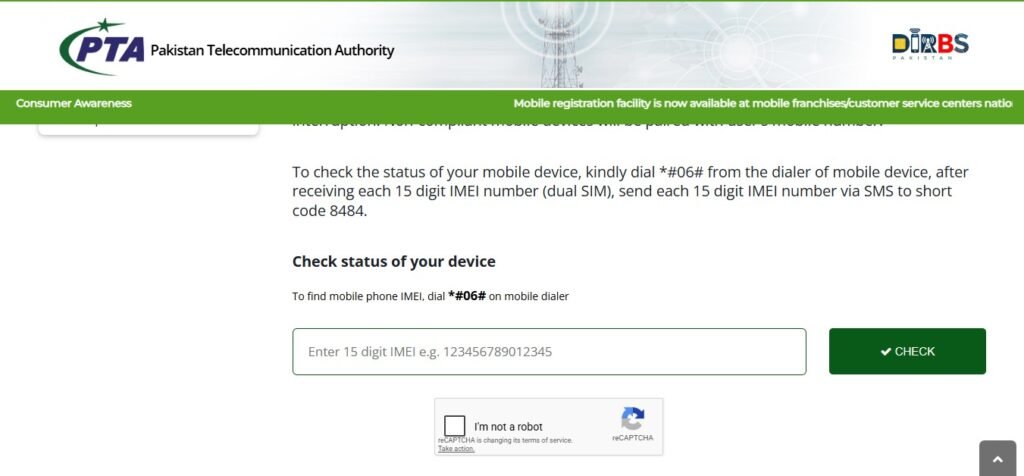
This method is especially useful when buying a second-hand phone, as it also confirms whether the IMEI has ever been reported lost, stolen, or blocked.
Method 2 – Check via SMS (8484)
- Open the messaging app
- Type the 15-digit IMEI number into the message body
- Send it to 8484.
You will receive the update in moments, confirming whether the device is Compliant, Non-Compliant, or Blocked. This works on any handset with SMS capability, making it the fastest option for checking a phone at the point of sale.
Method 3 – Dial *8484# USSD
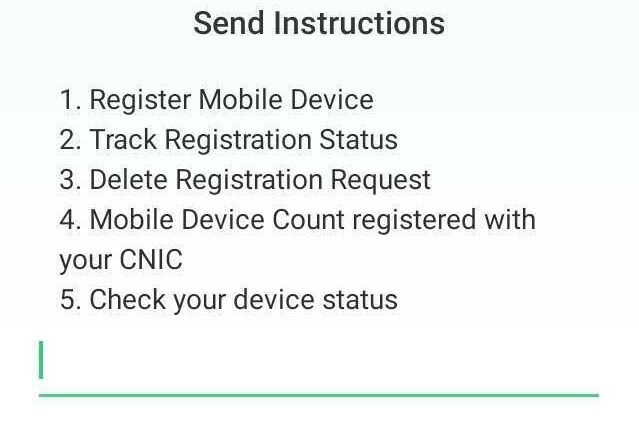
- Dialing *8484# opens a USSD menu directly on the screen
- Choose “Check your device status”, which is option 5 on the list
- Enter your device’s IMEI and the network returns the status immediately.
This method is useful in areas with weak mobile data coverage, since USSD codes work over the voice network.
What Information Does a PTA Tax Check Show?
When you run a check using your 15-digit IMEI number, it provides the device registration status (compliant, non-compliant, or blocked) and the exact make and model of your mobile phone.
Why Should You Check the PTA Tax Before Buying a Mobile?
Buying a phone in Pakistan without checking its PTA status first carries the same risk as buying a car without checking its registration papers. Since imported iPhones are among the priciest to register, it’s worth checking the exact PTA tax on iPhone in Pakistan before you agree on a price.
- A phone blocked by PTA cannot access Pakistani mobile networks. Purchasing such a device without checking its status will cost you more than expected, and you might be unable to register it at all.
- Imported smartphones are subject to taxes and duties. Checking the device up front tells you the exact registration cost up front. It eliminates surprises and allows you to get a better price.
- Many sellers advertise phones as “PTA Approved” without providing proof. Verifying the IMEI yourself ensures that the device is genuinely compliant
- Protects buyers from sellers who quietly offload a device close to its 60-day cutoff, leaving the new owner to deal with a blocked handset within weeks of paying for it.
Taking a minute to verify the phone’s status through official channels can save you from unexpected expenses and the inconvenience of dealing with a non-functional device after purchase.
How to Register Your Phone and Pay PTA Tax Online (Complete Step-by-Step Method)
If your device isn’t registered, the next step is to complete registration and pay any applicable taxes. PTA has streamlined the process through DIRBS.
Before you begin, keep your IMEI number and identification document handy, and always double-check them before submitting.
Follow these steps to register your phone and PTA the PTA tax online to stay compliant with the country’s regulations.
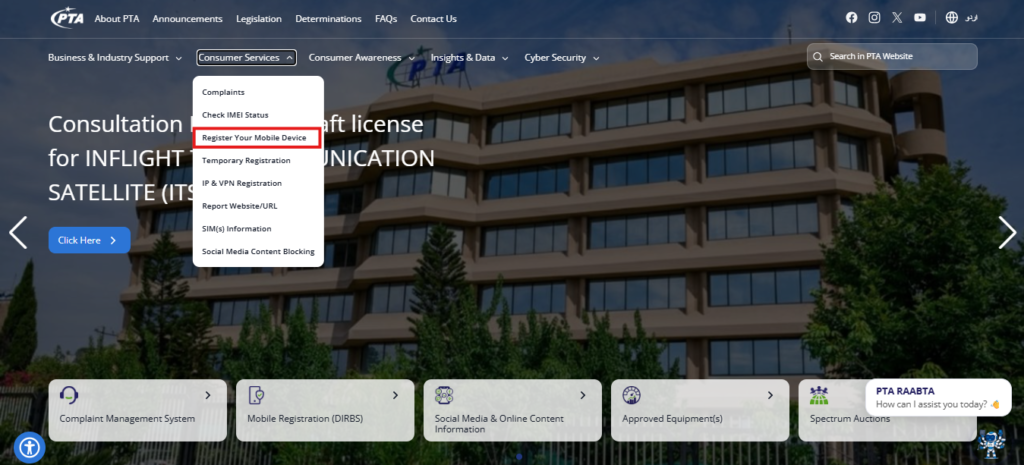
1. Visit the official PTA website: https://www.pta.gov.pk/
2. From the homepage, click on the Online Mobile Registration option.
3. A login page will appear. Enter your email address and password if you already have an account. If you’re a new user, select Sign Up.
4. After choosing Sign Up, you’ll be taken to the account registration page, where the terms and conditions are displayed.
5. Read these terms carefully before proceeding. They include important information, such as the free registration allowance for one mobile device per year and the requirement for international travelers to register their device within 60 days of arriving in Pakistan.
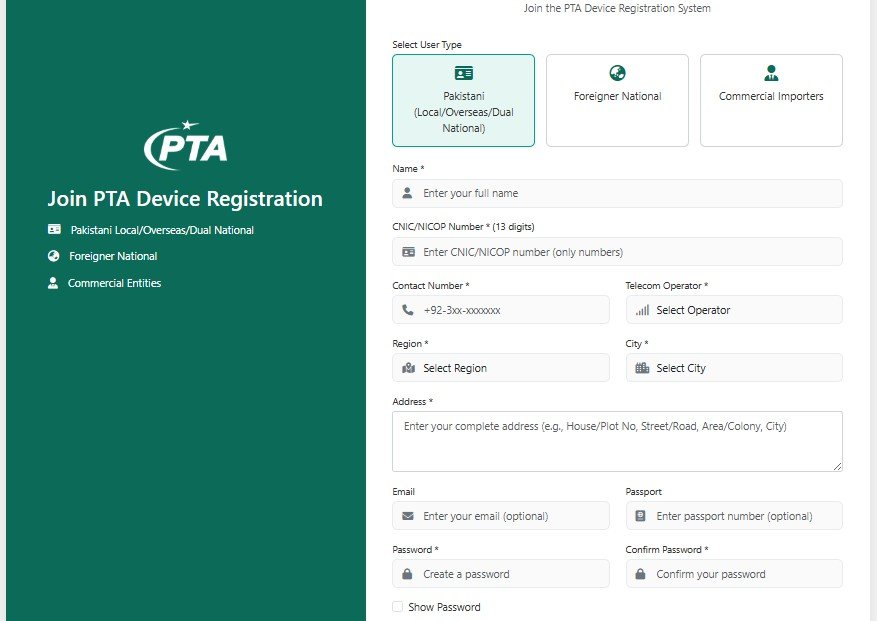
6. Below the terms and conditions, you’ll find the registration form. Select the appropriate Purpose and User Type.
7. Complete the form and verify that your CNIC or passport details are entered correctly.
8. Once the form is submitted, a verification email will be sent to the email address you provided.
9. Open the email and click the verification link.
10. You’ll then be redirected to the login page. Sign in using your registered email address and password.
11. After logging in, a declaration page will appear with important instructions. Read them carefully before selecting Click Here to Register Your Device.
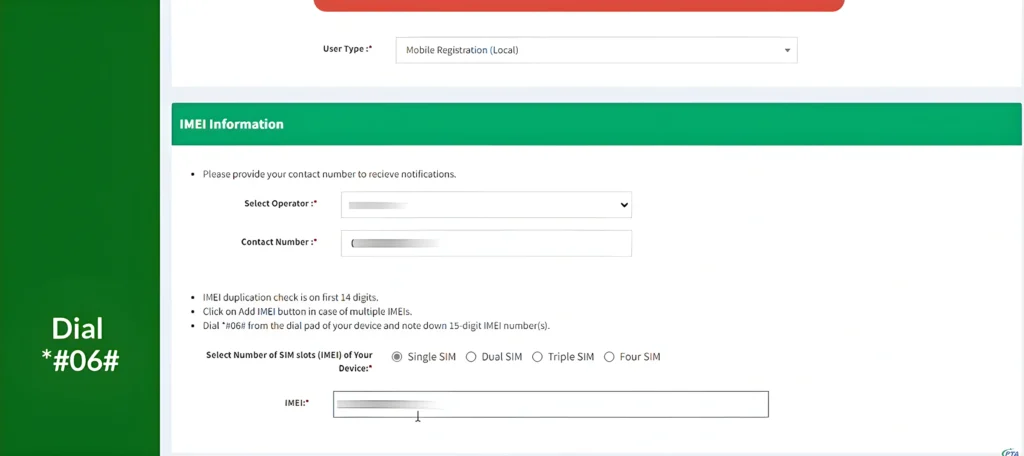
12. Choose the appropriate user type, enter your contact number and IMEI number(s) based on the number of SIM slots in your phone.
13. Click Submit to complete the process. You’ll receive a confirmation email once your mobile device has been successfully registered.
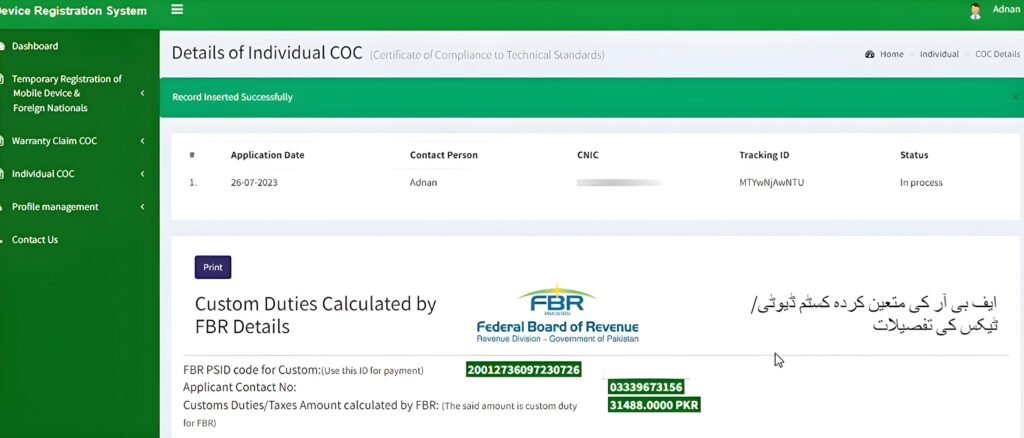
Clicking submit will generate the PSID. Once you have cleared the payment through an authorized channel such as a bank, JazzCash, or Easy Paisa, the cellular service will be restored within 3 to 4 hours. If services are not resumed within 24 hours, even if the DVS system shows a compliant status, lodge a complaint through the PTA Complaint Management System.
You can track your device’s status by checking its IMEI through the official DIRBS portal after completing the payment.
Why Does Pakistan Charge PTA Tax on Mobile Phones?
PTA tax is the duty and sales tax charged on an imported mobile phone when it’s registered for use on Pakistani networks, calculated by the FBR based on the device’s declared value and registration type.
The system serves several important purposes.
- Curbs illegal mobile imports: Discouraging the use of smuggled or undocumented mobile phones entering the country outside the legal import process.
- Protect the legal market: The registration framework also supports businesses that import and sell mobile phones through authorized channels.
- Contribute to national revenue: Taxes collected during registration contribute to the national exchequer and support public spending across sectors.
- Support fair taxation: This creates a more balanced taxation system and ensures legally imported devices are treated consistently.
How Much Is the PTA Tax on Mobile Phones?
PTA mobile registration tax in Pakistan is not a fixed, flat fee; it varies dynamically based on FBR uses the following charges to calculate the PTA tax rate for your mobile phone:
- Customs Duty – Based on the phone’s assessed value, converted to PKR using the applicable State Bank exchange rate.
- Regulatory Duty (RD) – An additional duty that varies by the phone’s value, ranging from 0% to 25%
- Sales Tax (GST) – Currently 18% on the combined customs and regulatory duty amount.
- Withholding Tax (WHT) – Depends on whether you’re an Active Taxpayer List (ATL) filer or a non-filer.
- Method of Registration – Whether you use CNIC or passport
FBR periodically updates the duty slabs, so searching for fixed tax tables online often yields outdated or inaccurate information. Our online PTA tax calculator reflects the latest rates, so you can find the exact amount of tax payable for your mobile phone.
Can Foreign Nationals Use Their Phones in Pakistan Without PTA Tax?
Overseas Pakistanis and foreign nationals visiting Pakistan can use their personal mobile phones for up to 120 days per visit without paying any PTA taxes or duties. This facility is available on every trip to Pakistan and is verified using FIA immigration records.
Foreign nationals and overseas Pakistanis visiting for a short period can watch this step-by-step procedure to temporarily register their mobile devices.
What Happens If You Don’t Pay PTA Tax?
A device that isn’t registered within 60 days of its first SIM insertion loses cellular service entirely. You will not be able to make any calls, send an SMS, or use mobile data on any Pakistani network.
Final Verdict
An online PTA tax check takes less than 2 minutes and settles a question that would otherwise surface at the worst possible moment. Checking your phone’s PTA status should be the first step whenever you buy an imported mobile phone in Pakistan. A quick IMEI verification tells you whether the phone is already registered and eligible for use on local mobile networks.
If your device requires registration, completing the process through the official DIRBS portal and promptly paying the applicable taxes helps prevent unnecessary delays and service interruptions.